
Onboarding Process for Victim Services Client
This document is a guide outlining the essential information needed for a smooth client onboarding experience, ensuring that all relevant details are collected efficiently for a seamless transition into our services.
Client Information
Path: Halaxy > Add Client
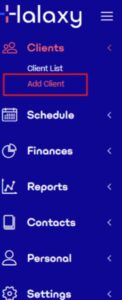
When onboarding a new client, please gather the following information:
- Full Name: The client’s complete name.
- Preferred Name: The clients have preferred name.
- Email Address: The client’s email for communication.
- Date of Birth: The client’s date of birth.
- Home Address: The client’s residential address.
- Mobile Number: The client’s contact number.
- Notes: Admin needs to put additional information to help the practitioner understand the issue.
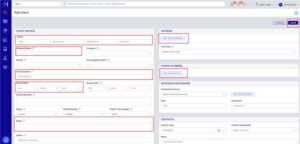
Path: Funds>Claims & Referrals
- Reference Number: The number to claim for the session.
- Organisation: Victim Services
- Add Referral: This is the number of sessions approved.

How to Submit a New Client to the Victim Services Portal
- Log in to the portal using the practitioner username and password. https://vsconnect.my.site.com/counsellors/s/login/
- Go to My Requests.
- Go to my My Requests

- Click Client Assignment
- Click NEXT
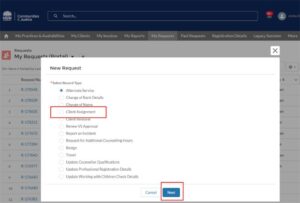
- Enter the following Request Information:
- Case Number
- Client Full Name
- Date of Birth
- Date of Scheduled Appointment
- Click SAVE
